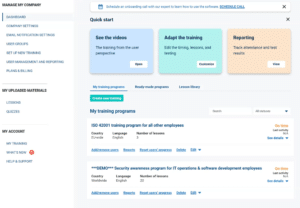
To help you set up your first training program, Company Training Academy provides a guided onboarding process that walks you through the key setup steps. The setup usually takes 5–10 minutes.
To set up your first training program, do the following:
- Log in to your Company Training Academy.
- Complete your company information in Company settings.
- Configure email notifications in Notification settings.
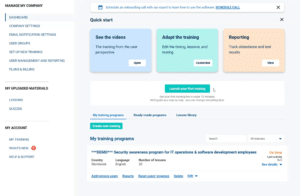
- Launch your first training from the Launch your first training section on the Dashboard.
After completing these steps, your training programs will appear in the My Training Programs section of the Dashboard.
Company settings
In Company settings, you can enter your company name, country, and logo, and manage training and reporting administrators.
To see more information about this section, read the Company settings article.
Notification settings
In the Notification settings, you can edit the text and the timing of email notifications for your company users that are sent automatically for each lesson that you mark as mandatory.
To see more information about this section, read the Notification settings article.
Launch your first training
In the Launch your first training section, you can:
- choose a ready-made training program,
- create your own program from the Lesson Library,
- configure lesson frequency and training settings,
- assign users or user groups,
- configure quizzes and testing.
The platform also provides recommended ready-made programs based on your selected framework or training needs.
To learn more, read the Set up new training article.
Training program display
After your training is launched, it will appear in the My Training Programs section, where you can monitor user progress and manage training activities.